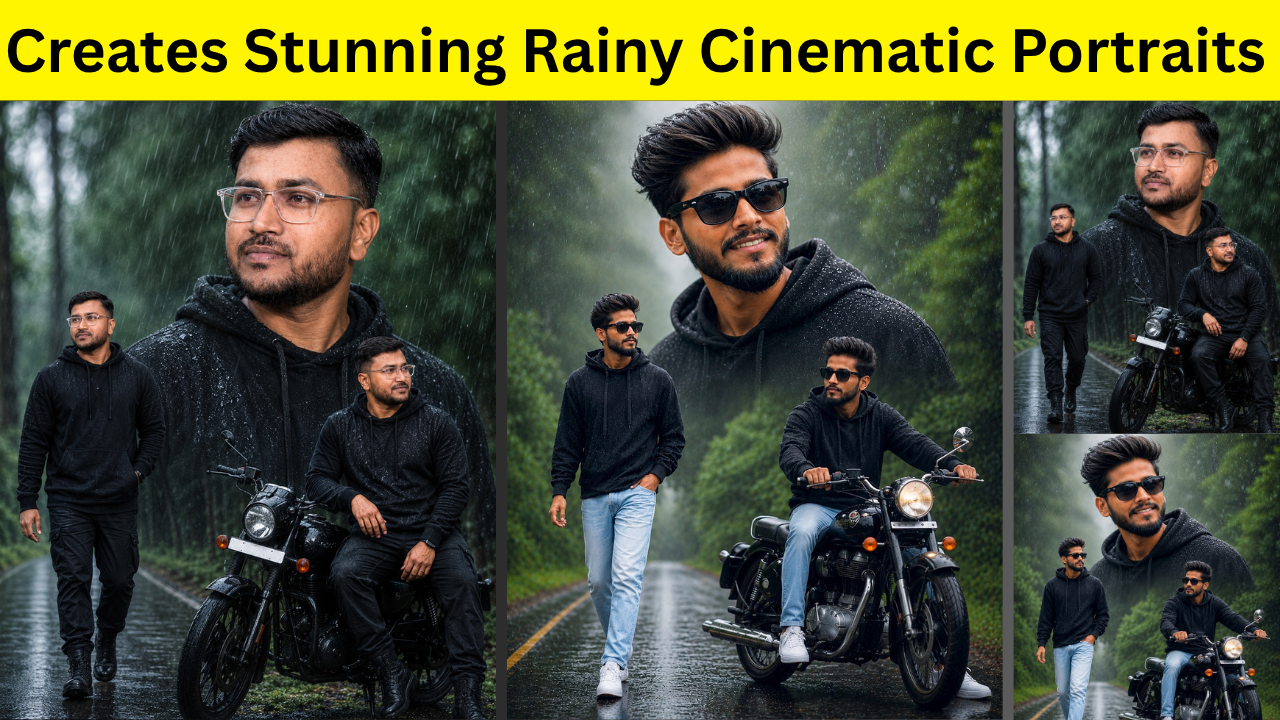
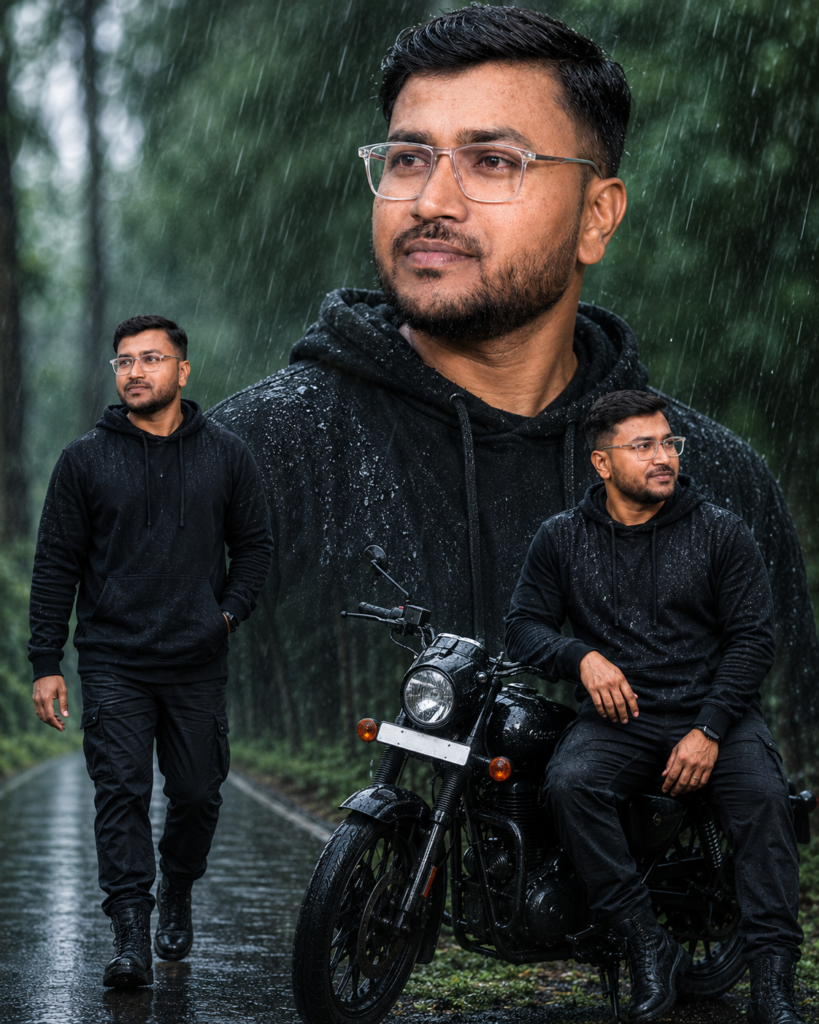
Have you ever seen those stunning rainy-day portraits on Instagram and wondered how people create them? The dramatic rain, soft fog, green forest roads, cinematic lighting, and realistic facial details make these images look like they were captured by a professional photographer with an expensive DSLR camera.
The good news is that you don’t need professional photography skills or expensive editing software anymore. With ChatGPT and modern AI image generation, you can transform a simple selfie into an ultra-realistic cinematic rainy portrait within minutes.
In this guide, I’ll show you exactly how it works, what kind of photo you should upload, and how to use a well-written prompt to get amazing results.
Let’s get started.
Why Rainy Cinematic Portraits Are So Popular
Rain has a magical effect on photographs. It creates emotion, adds depth, and makes ordinary scenes look extraordinary. When combined with AI image generation, you can create images that look like they belong in a movie. These portraits are popular because they include:- Dramatic rainy atmosphere
- Soft cinematic lighting
- Beautiful green backgrounds
- Realistic facial details
- DSLR-style depth of field
- Professional Instagram look
What You Need Before You Start
Creating a realistic AI portrait is surprisingly simple. You only need three things:- A clear selfie
- ChatGPT with image generation support
- A detailed prompt
Choose the Right Photo
The quality of your final image depends heavily on the photo you upload. For the best results:- Use a clear, high-resolution photo.
- Make sure your face is visible.
- Avoid heavy filters.
- Good natural lighting works best.
- Don’t crop your head too closely.
- Wear simple clothing if possible.
Upload Your Photo
Open ChatGPT and upload your selfie. The AI uses your uploaded image as the reference while following your prompt. This helps it preserve your facial features instead of creating a completely different person. If your goal is realism, always upload your own photo first.Use a Detailed Prompt
The prompt tells the AI exactly what kind of image you want. Instead of writing something simple like:“Create a rainy portrait.”Describe everything you want to see. For example:
- rainy weather
- black hoodie
- black sunglasses
- forest road
- soft fog
- cinematic lighting
- DSLR photography
- natural skin texture
- bokeh background
- 8K quality
Example Prompt
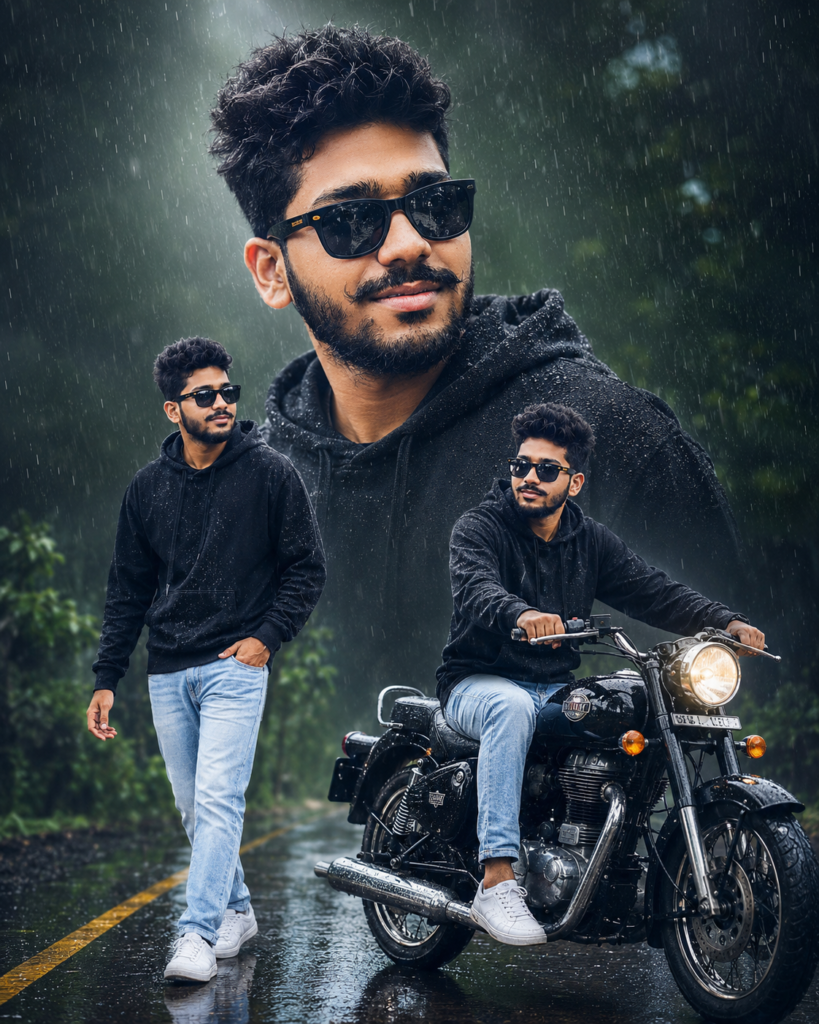
Here is an example of a cinematic rainy portrait prompt:Ultra-realistic cinematic rainy-day portrait collage of a stylish young Indian man with voluminous fluffy hair, black sunglasses, trimmed beard, and black hoodie.
Large smiling close-up portrait in the background with rain droplets on clothes and glasses.
Left side: full-body walking pose on a wet forest road.
Right side: seated pose beside a classic black motorcycle.
Lush green trees, monsoon atmosphere, reflective wet road, soft fog, shallow depth of field, dramatic lighting, highly detailed face, natural skin texture, vibrant colors, professional DSLR photography, bokeh background, ultra-sharp focus, 8K quality, Instagram poster design, photorealistic, cinematic mood.
Don’t Forget the Negative Prompt
A negative prompt tells the AI what you don’t want. This helps reduce common AI mistakes. Example:- blurry
- low quality
- watermark
- extra fingers
- deformed face
- duplicate person
- text
- logo
- cartoon
- painting
- cropped body
- distorted hands
- noise
Best Settings to Use
For this style, these settings work well: Aspect Ratio: 4:5 Quality: HD or 8K Style: Photorealistic Lighting: Cinematic Weather: Rain Effect These settings help produce a portrait that is perfect for Instagram posts and social media.Tips for Better Results
Sometimes the first image isn’t perfect. That’s completely normal. Here are a few simple tricks that can improve your results.1. Keep Your Face Consistent
If the AI changes your face too much, simply add:Keep facial features exactly the same as the uploaded image.
2. Be Specific About Poses
Instead of writing:Sitting on a bikeWrite:
Naturally seated on the motorcycle seat with both feet resting comfortably on the ground and hands holding the handlebars.Small details help the AI understand the pose more accurately.
3. Mention Camera Style
Adding camera details makes a huge difference. Examples:- DSLR photography
- Canon EOS R5
- Sony Alpha
- 85mm portrait lens
- shallow depth of field
- ultra-sharp focus
4. Improve the Background
Instead of saying:ForestDescribe it like this:
Rain-soaked forest road with lush green trees, soft fog, reflective wet asphalt, natural mist, cinematic atmosphere.The more visual your description is, the more beautiful your final image becomes.
5. Regenerate if Needed
AI image generation isn’t always perfect. If something looks wrong:- regenerate the image
- change one sentence
- adjust the pose
- improve the lighting description
Common Mistakes to Avoid
Many beginners make these mistakes. Avoid them for better results.Using blurry photos
A blurry selfie leads to blurry AI portraits.Writing very short prompts
Short prompts give the AI very little information. Detailed prompts almost always perform better.Adding too many conflicting ideas
Don’t mix:- rainy weather
- beach
- snowfall
- desert
Ignoring the negative prompt
Without a negative prompt, AI may generate:- extra hands
- distorted fingers
- duplicate people
- unwanted text
Where Can You Use These Images?
These cinematic portraits are perfect for:- Instagram posts
- Instagram Reels cover photos
- YouTube thumbnails
- Facebook posts
- WhatsApp profile pictures
- Personal branding
- Blog featured images
- Portfolio websites
- Digital posters
Conclusion
AI image generation has completely changed the way we create portraits. What once required a professional photographer, expensive equipment, and hours of editing can now be achieved with a single well-crafted prompt. The secret isn’t using complicated software—it’s writing clear, descriptive prompts and starting with a good-quality reference photo. Once you understand how prompts work, you can experiment with different styles, weather effects, outfits, and backgrounds to create unique portraits that match your personality. If your first attempt isn’t perfect, don’t get discouraged. AI often needs a little guidance. Adjust your prompt, regenerate the image, and keep refining it until you’re happy with the result. With just a few minutes of effort, you can create cinematic rainy-day portraits that look professional, eye-catching, and ready to share on social media. Whether you’re a content creator, influencer, or simply someone who enjoys creative photography, this technique is an easy way to make your photos stand out.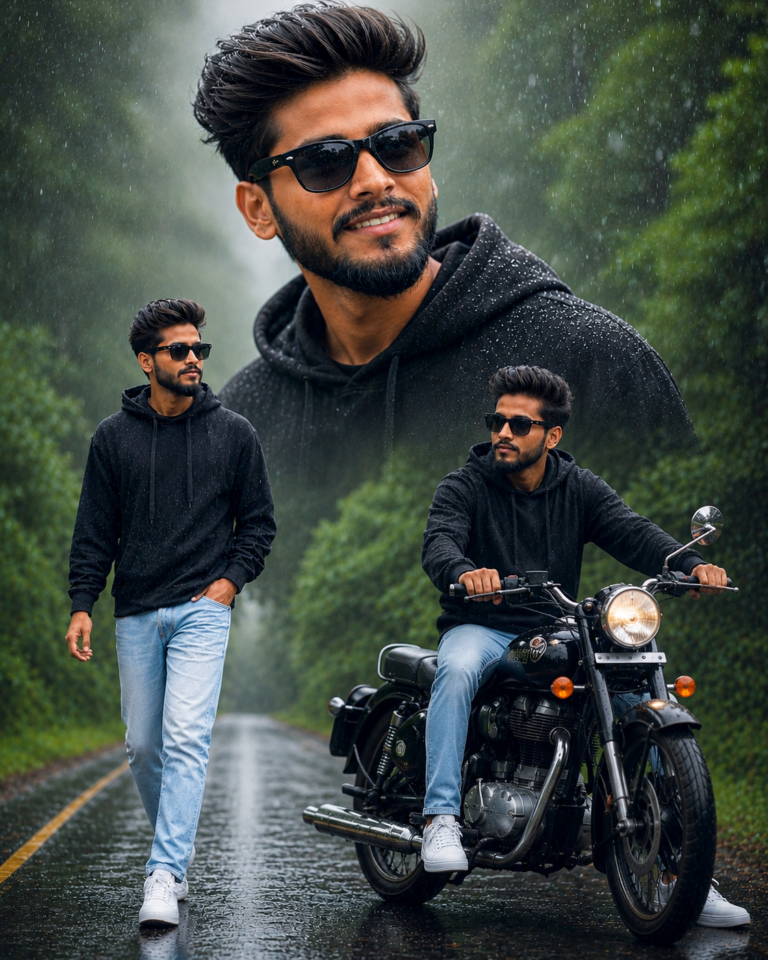
Prompt Preview:
Ultra-realistic cinematic rainy-day portrait collage of a stylish young Indian man with voluminous fluffy hair, black sunglasses, trimmed beard, and black hoodie...
Ultra-realistic cinematic rainy-day portrait collage of a stylish young Indian man with voluminous fluffy hair, black sunglasses, trimmed beard, and black hoodie...
Ultra-realistic cinematic rainy-day portrait collage of a stylish young Indian man with voluminous fluffy hair, black sunglasses, trimmed beard, and black hoodie.

Large smiling close-up portrait in the background with rain droplets on clothes and glasses.

Left side: full-body walking pose on a wet forest road.

Right side: seated pose beside a classic black motorcycle.

Lush green trees, monsoon atmosphere, reflective wet road, soft fog, shallow depth of field, dramatic lighting, highly detailed face, natural skin texture, vibrant colors, professional DSLR photography, bokeh background, ultra-sharp focus, 8K quality, Instagram poster design, photorealistic, cinematic mood, 4:5 aspect ratio.

Negative Prompt:

blurry, low quality, extra fingers, deformed face, duplicate person, watermark, text, logo, oversaturated colors, cartoon, painting, cropped body, distorted hands, noise.

Settings:

Aspect Ratio: 4:5

Quality: HD / 8K

Style: Photorealistic, Cinematic, Rain Effect
Prompt Preview:
Ultra-realistic cinematic rainy-day portrait collage of a stylish young Indian man with voluminous fluffy hair, black sunglasses, trimmed beard, and black hoodie...
Ultra-realistic cinematic rainy-day portrait collage of a stylish young Indian man with voluminous fluffy hair, black sunglasses, trimmed beard, and black hoodie...
Ultra-realistic cinematic rainy-day portrait collage of a stylish young Indian man with voluminous fluffy hair, black sunglasses, trimmed beard, and black hoodie.

Large smiling close-up portrait in the background with rain droplets on clothes and glasses.

Left side: full-body walking pose on a wet forest road.

Right side: seated pose beside a classic black motorcycle.

Lush green trees, monsoon atmosphere, reflective wet road, soft fog, shallow depth of field, dramatic lighting, highly detailed face, natural skin texture, vibrant colors, professional DSLR photography, bokeh background, ultra-sharp focus, 8K quality, Instagram poster design, photorealistic, cinematic mood, 4:5 aspect ratio.

Negative Prompt:

blurry, low quality, extra fingers, deformed face, duplicate person, watermark, text, logo, oversaturated colors, cartoon, painting, cropped body, distorted hands, noise.

Settings:

Aspect Ratio: 4:5

Quality: HD / 8K

Style: Photorealistic, Cinematic, Rain Effect
Prompt Preview:
Ultra-realistic cinematic rainy-day portrait collage of a stylish young Indian man with voluminous fluffy hair, black sunglasses, trimmed beard, and black hoodie...
Ultra-realistic cinematic rainy-day portrait collage of a stylish young Indian man with voluminous fluffy hair, black sunglasses, trimmed beard, and black hoodie...
Ultra-realistic cinematic rainy-day portrait collage of a stylish young Indian man with voluminous fluffy hair, black sunglasses, trimmed beard, and black hoodie.

Large smiling close-up portrait in the background with rain droplets on clothes and glasses.

Left side: full-body walking pose on a wet forest road.

Right side: seated pose beside a classic black motorcycle.

Lush green trees, monsoon atmosphere, reflective wet road, soft fog, shallow depth of field, dramatic lighting, highly detailed face, natural skin texture, vibrant colors, professional DSLR photography, bokeh background, ultra-sharp focus, 8K quality, Instagram poster design, photorealistic, cinematic mood, 4:5 aspect ratio.

Negative Prompt:

blurry, low quality, extra fingers, deformed face, duplicate person, watermark, text, logo, oversaturated colors, cartoon, painting, cropped body, distorted hands, noise.

Settings:

Aspect Ratio: 4:5

Quality: HD / 8K

Style: Photorealistic, Cinematic, Rain Effect
Discover more from viraldost.com
Subscribe to get the latest posts sent to your email.